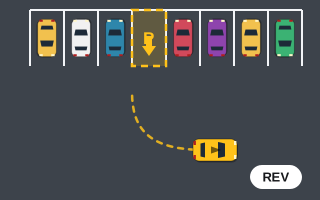
Reverse parking games are parking challenges where you have to back into the space instead of driving in nose-first. On Play Parking, you can recognize them by the arrow inside the bay. It points out of the space, which means your car's nose has to face outward when you finish. The only way to get there cleanly is to approach, stop, and reverse in.
This explainer covers how the games decide you have reversed in correctly, why the controls feel odd at first, and where each reverse-focused game fits in the lineup. If you want a drill-by-drill training plan instead, head to our companion piece on how to master reverse parking in games.
How the game knows you backed in
The game doesn't track the path you took. It only checks the final state. For a reverse-in bay, three things must be true when the car comes to rest:
- All four corners of the car are inside the dashed rectangle.
- The car's nose points in the direction of the bay's arrow, within the angle tolerance (12° normally, 8° in the precision games).
- The car is nearly stopped and stays that way while the "Hold…" indicator fills.
That means you could, in theory, drive in forward, turn around inside a huge bay and finish facing out. In practice the bays are only a little larger than the car, so the arrow effectively forces a back-in. If you slip in nose-first by mistake, the HUD will show "Angle off" even though you're inside, because your heading is about 180° from what the bay wants.
Why reversing feels backwards
When the car rolls backward, the rear leads. Steering left swings the rear of the car to the left, and from the driver's point of view the nose swings the other way. That matches how a real car behaves in reverse, yet on a top-down screen it catches almost everyone out. The car on your screen may be pointing down, so "left" on the keyboard can look like "right" on the monitor.
A simple mental shortcut: in reverse, steer toward the side you want the back bumper to go. Stop thinking about where the nose is pointing and think about the tail.
Two more engine details matter here. Reverse top speed is roughly half of forward top speed, which gives you more time to react. And because turning is sharper at low speed, a slow reverse lets the tail swing in tightly, often tighter than you expect.
Getting into reverse without fumbling
There is no gear selector. Hold S, Arrow Down or the "BRAKE / REV" button: the car brakes, stops, and if you keep holding, starts rolling backward. That creates one common trap. If you only want to stop, holding S a fraction too long sends you backward into whatever is behind you. Use Space for pure stops, since it brakes but never reverses, and save S for when you actually want to back up.
The reverse-focused games
| Game | Difficulty | What changes |
|---|---|---|
| Reverse Parking | Medium | Five levels, every bay reverse-in. You start facing away from or past the bay, and the neighboring cars close in a little more each level. |
| Tight Parking | Hard | Very narrow bays with an 8° tolerance. The later levels switch to reverse-in, and you are allowed only 3 collisions. |
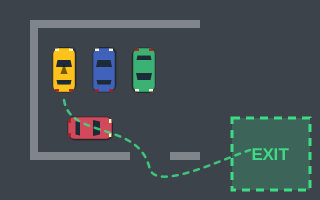
| Parking Escape | Medium | No bay at all. You begin boxed in by cars and walls and usually need to reverse out before you can drive to the green EXIT zone. Collision limit of 3. |
Other games use direction-marked bays too. Parking Challenge introduces one in its later levels, and the Daily Parking Challenge picks a random bay direction each day, so a back-in can show up there without warning. You'll find the whole set on the reverse parking games category page.
A typical back-in, described
In Reverse Parking you start facing away from the bay or already past it, with its arrow pointing out toward the open lane. A clean approach from that kind of start usually goes like this:
- Drive forward past the bay until your rear bumper is a car length or so beyond it. Don't stop level with the bay. You need that overshoot to have room to swing.
- Stop with Space.
- Hold reverse and steer toward the bay's side. The tail swings in, and the nose arcs away across the aisle.
- As the car lines up with the bay's painted edges, release the steering so it self-centers, and keep backing straight in.
- Stop with Space once the front corners cross the entrance line, then wait out the "Hold…".
If the tail is heading for a neighbor, don't keep reversing. Drive forward a short distance to reset the angle, then try again. Just remember the Perfect Park game charges 25 points for every forward/reverse change, while Reverse Parking itself doesn't.
Scoring notes specific to reversing
Because reverse speed is capped lower, back-in levels tend to eat more time. The time bonus pays 10 points per second under par, so a clean single-sweep reverse is worth more than a three-point shuffle, but only if it doesn't cost a collision. One bump is −100, which erases ten seconds of time bonus. When in doubt, go slower. More on the math in our scoring breakdown.
Ready to practice? Start with Reverse Parking, then read our tips for tight parking games before tackling the narrow back-in bays of Tight Parking.