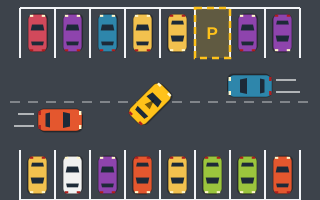
Parking game physics are deliberately simple. Play Parking games use an arcade model, not a simulation: a bicycle-style car that speeds up, slows down with friction, bounces lightly off anything solid and is judged by a clear set of rules when it stops in a bay. There's no tire grip model, no suspension and no damage.
That simplicity is the point. Predictable physics let you plan a park and trust that the same inputs will produce the same result. This guide explains the pieces, how HTML5 games commonly build them, and what each one means for your driving.
The frame loop and delta time
Browser games update and redraw many times per second. The usual tool is requestAnimationFrame, which asks the browser to call a function right before the next screen repaint. Each call, the game reads input, moves the car, checks collisions and draws the scene on a canvas.
Screens refresh at different rates, so a well-built loop measures delta time, the number of milliseconds since the last frame, and scales every movement by it. A car moving at a given speed covers the same distance per second whether your display runs fast or slow. In a loop built this way, the car's speed doesn't depend on how fast your screen refreshes, which keeps timers and par times meaningful from one device to another.
Speed, acceleration and friction
In the Play Parking engine, holding the gas builds speed toward a top speed. Releasing all pedals doesn't stop the car instantly; friction slows it gradually. Braking slows it much faster. Holding the brake after the car stops starts reverse, and top forward speed is roughly twice the reverse speed.
Three practical results follow:
- Coasting is a tool. Letting friction slow you on the approach to a bay gives a smooth, predictable deceleration and lets you steer with your full attention.
- Reverse is naturally gentle. Because reverse tops out lower, backing into a bay is slower and easier to control than driving in forward at full speed.
- Stopping takes distance. Braking late at high speed carries you past the bay. Start slowing earlier than feels necessary.
Steering, briefly
The car only turns while moving, turns more sharply at low speed than at top speed, and self-centers its steering when you let go. In reverse the rear leads, so steering left swings the rear left. The full reasoning behind those rules is in how vehicle steering works in arcade games.
Collisions: detection and response
Detecting a hit
Top-down games often treat the car and each obstacle as rectangles that can rotate, called oriented bounding boxes. A common way to test whether two rotated rectangles overlap is the separating axis idea: if you can find any line onto which the two shapes' shadows don't overlap, they aren't touching. For rectangles, you only need to check the directions of their edges, which makes the test fast enough to run every frame for every nearby obstacle.
Responding to a hit
In the Play Parking engine, touching a parked car, wall, pillar, curb, cone or moving traffic car counts as one collision. A short cooldown stops a single scrape from counting many times. The car bounces back slightly and loses speed. Each collision costs 100 points, and some levels set a collision limit that fails the level when exceeded.
The bounce is the physics detail that trips people up. After a hit, the car isn't where you left it. If you immediately repeat the same input, you can end up hitting the same obstacle again once the cooldown ends. Brake, reassess, then continue.
| Game | How collisions bite |
|---|---|
| Tight Parking | Collision limit of 3, with side margins shrinking to about 3 game units |
| Traffic Parking | Moving cars loop the aisles; collision limit of 3 |
| Cone Parking | Every cone touched is a collision, under a time limit |
| Parking Rush | Each collision also costs 2 seconds of the countdown |
Moving traffic
In Traffic Parking, cars move along the aisles on a loop, and that traffic gets faster and denser each level. The movement is simple and predictable lane traffic, not cars reacting to you. That predictability is useful: watch one loop, note where the gaps appear, and time your crossing. City Parking uses light moving traffic along its roads in the same spirit.
The bay check: physics meets rules
A park isn't decided by feel. Each frame, the game checks whether:
- All four corners of the car are inside the bay.
- The heading is within the angle tolerance: usually 12°, and 8° in Tight Parking, Precision Parking and Perfect Park.
- If the bay shows an arrow, the car's nose points in that direction.
- The car is nearly stopped.
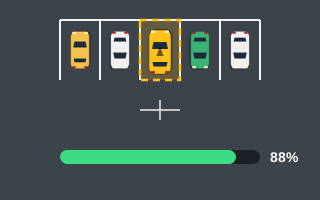
When all of that stays true for about half a second while the "Hold…" indicator fills, the level completes. The accuracy score blends position (60%) and angle (40%), and 90% or more earns "Perfect Park!" In Precision Parking, each level also sets a minimum accuracy, and the HUD shows "Needs X% accuracy" if you settle short. The scoring guide shows how accuracy turns into points, and the precision parking guide covers how to raise it.
Saving your best
Once a run ends, the best run score and best time are saved in your browser using localStorage. Those records stay on your device, and no account is needed. Clearing your browser's site data resets those records.
What to take onto the lot
Coast into the approach, brake early, expect a bounce after any hit, and stop fully before judging your position. Those four habits line up directly with how the engine works, and they make the physics feel like an ally instead of a surprise. You can test them in the traffic parking games, where timing matters as much as position.